
Get answers to your questions about:
Contractual consumption and limits
1. Can I continue sending messages after reaching the package limit?
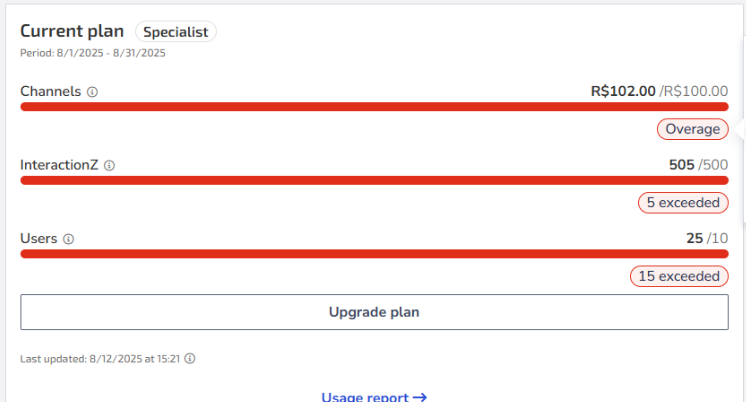
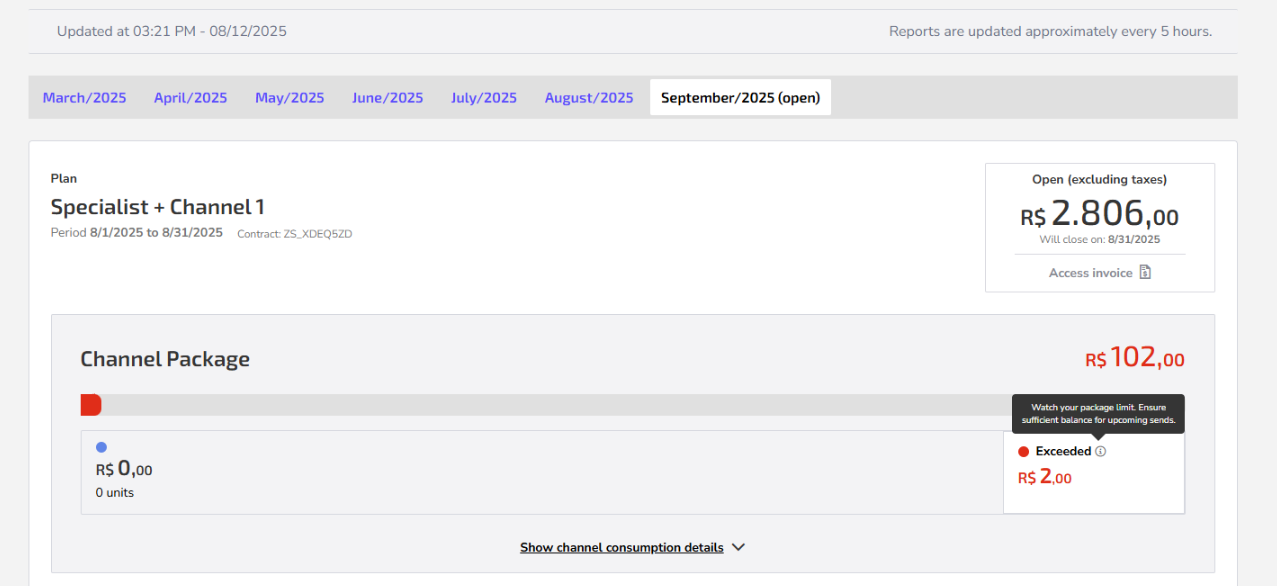
You can send messages beyond the contracted package, but there is a limit defined by your plan. The total value of the used package, plus any additional messages, will be charged as overage on the next invoice.
If usage exceeds what your plan allows, message sending will be temporarily blocked.
The system sends notifications before reaching the limit and also when a block occurs, so there are no surprises.
To resume sending messages, you need to:
- Pay the current invoice to restore usage.
- Increase your package value by adjusting the plan.
💡 Tips to avoid blocks:
|
2. I want to increase my number of users, how do I do that?
Each software plan has a specific number of users included in the price, but you can still add more users for an additional fee.
To increase the number of users in your software plan, follow these steps:
- In Zenvia Customer Cloud, go to Settings > Users and organization;
- If the number of users has already exceeded the quantity allowed by the plan, when trying to add a new user, a message will inform you that you have exceeded the limit.
You can check the number of users available in your plan on the Current plan card on the homepage, or Analytics > Usage.
When you add an additional user, they will receive an email invitation. The user will only be considered excess after accepting the invitation and becoming active within the software.
Billing and invoicing
1. Why do I have an additional charge on the invoice?
It may happen that you have added more users than provided by your plan or that the InteractionZ consumption has exceeded. For this reason, there was an additional charge.
See the user and InteractionZ limit per plan:
- Starter: up to 1 user and 100 InteractionZ;
- Expert: up to 10 users and 500 InteractionZ;
- Specialist: up to 50 users and 2,000 InteractionZ;
- Professional: up to 50 users and 5,000 InteractionZ;
- Enterprise: users and InteractionZ upon inquiry.
Consult additional charges at https://www.zenvia.com/en/customer-cloud/.
2. What is the Setup and when should it be paid?
The Setup refers to the initial services required to get your operation up and running, such as onboarding training and initial platform configurations, ensuring smooth use of Zenvia Customer Cloud.
The Setup fee is always charged together with the invoice for the following month, according to the contracted billing cycle.
3. Setup Fee: why does this charge appear on my invoice?
The Setup is a one-time fee charged at the beginning of the contract to enable the technical implementation of your operation.
4. What is included in the Setup?
- Channel configuration (WhatsApp, SMS, and APIs)
- Technical integrations
- Onboarding and initial training
This step ensures that your operation starts ready to use.
5. Should this charge have been communicated?
Yes. The Setup fee:
- Is included in the contract
- Appears in your approved Commercial Proposal
It is usually charged on the first invoice after contracting.
6. Why might it seem like I wasn’t informed?
This may happen when:
- The proposal was not reviewed in detail
- The negotiation was handled by intermediaries
- The amount was presented within the total package, without being highlighted
7. Difference between Invoice and Payment Slip
In some cases, the invoice amount may be higher than the payment slip due to tax withholdings:
- Invoice (gross amount): total service value
- Payment slip (net amount): amount to be paid to Zenvia
The difference corresponds to taxes that your company must collect directly.
8. What if there is a discrepancy or a different agreement?
If you believe that:
- The amount was not agreed upon
- There is an agreement for Setup fee exemption
Open a financial ticket via Instant Support and provide:
- Company tax ID (CNPJ)
- Evidence of the agreement (such as emails or commercial proposal).
The finance team will validate and apply the necessary adjustments, if applicable.
What does the "Expired" (Expirado) amount mean on my statement?
The "Expired" amount is not a charge. It represents the portion of your monthly package that was not used within the billing cycle.
How does it work in practice?
Zenvia Customer Cloud plans are Monthly and Non-cumulative. This means that any unused balance at the end of the month expires and does not roll over to the next cycle.
For example:If your plan includes $2,000 in messaging and you used $1,200:
- $1,200 → Consumed
- $800 → Appears as Expired
This value simply indicates how much more could have been used during that period.
Important:
The expired amount is not charged.
It exists solely for consumption transparency.
Your balance is fully renewed at the start of the next cycle.
Plan management: Cancellation
1. How do I cancel my plan?
Do you want to cancel your account? That's too bad! 😔
In order for us to proceed with the cancellation, it is necessary to open a ticket with Instant Support locatedon the right side of Zenvia Customer Cloud.
Policies related to the validity, termination and suspension of services are described in detail in the clauses of the General Terms of Service. We recommend reading this document to understand the conditions applicable to cancellation and other contractual procedures.
🔗 Access the General Terms of Service here
As soon as Instant Support completes the request, our customer service team will proceed with the cancellation. You will receive an initial response from our team to the registered email. Remember to check your spam box.
What happens to billing after requesting a cancellation?
Even after you submit a cancellation request, you may still receive invoices. This happens for two main reasons:
1. Postpaid Model: Zenvia Customer Cloud operates on a postpaid basis. This means the invoice you receive covers the usage from the previous billing cycle.
2. 30-day Notice Period: Cancellations require a minimum of 30 days' notice before your cycle renewal date (anniversary date). If the request is made less than 30 days in advance, the contract will automatically renew for one final period to fulfill the notice requirement.
What does this mean in practice?
Depending on when you submit your request, you may receive up to two more invoices:
- One for the cycle already in progress.
- Another for the final notice period.
During this time:
- You can continue using the platform as usual.
- The cancellation only takes effect once the notice period ends.
- No further charges will be generated after the account is officially closed.
You can check your anniversary date, plan status, and billing history under: Settings > Financial Information
🎧 Still have questions? Open a financial support ticket via Instant Support so we can review your case.